Printer Jobs
The Printer Jobs section gives you a complete overview of every job processed by a printer, status, duration, ink usage, and more, so you can monitor performance and spot production issues early.
Navigation & Controls
- Search by Title (top-left).
- Pagination (bottom-left) lets you pick items per page and move through the list.

Need to focus on real orders and exclude tests or setup jobs?
Use the filter bar in the header to narrow results to the categories that matter to you.
How Jobs Are Grouped
Jobs are grouped by the print_job_id, a unique number assigned when the job enters the printer queue.
print_job_id?print_job_id is the most reliable way to group jobs, because it reflects what the printer actually produced.
It minimizes the risk of mix-ups when a single reference runs multiple times with different settings.
Three-Level Drill-Down
| Level | What You See | Purpose |
|---|---|---|
| Top Level | High-level KPIs aggregated by print_job_id. | Quick health check of each job. |
| Summary Level | Key timestamps, job metrics, and an ink-usage chart for all runs in the group. | Investigate overall job performance. |
| Run Level | A table of every individual run with exact timings and settings, plus a run-specific ink chart. | Deep dive into specific production runs. |
| Level | Example Screenshots |
|---|---|
| Top Level |  |
| Summary Level | 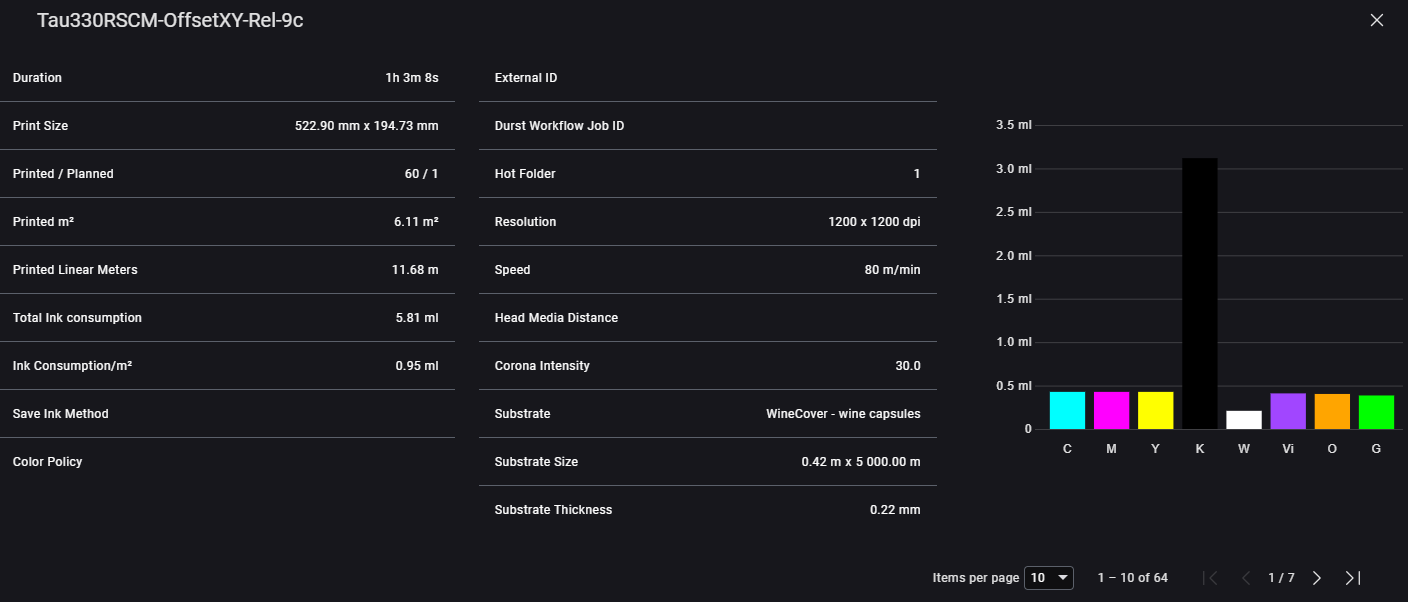 |
| Run Level | 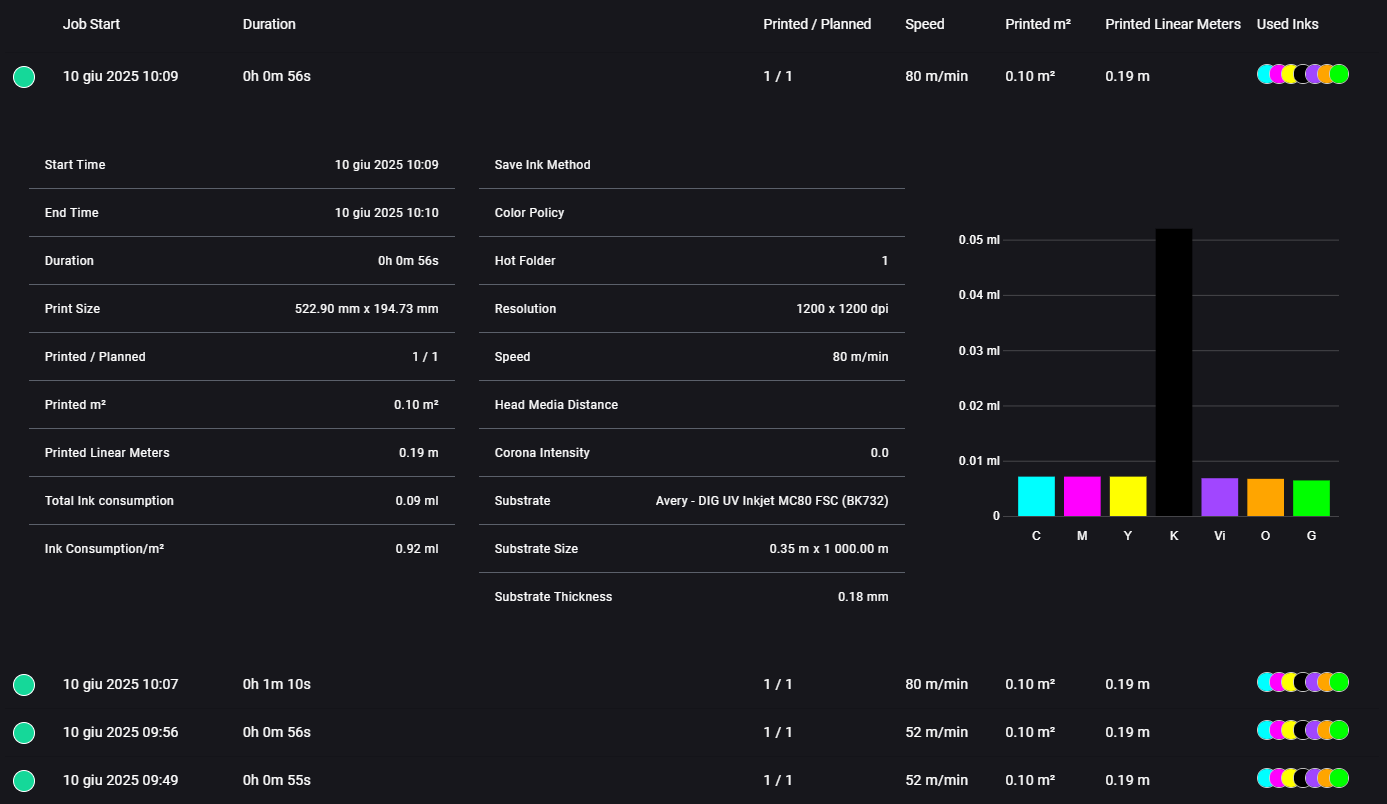 |
In rare cases, jobs with the same print_job_id may run with different settings.
Always open the Run Level view when you need exact details.
Views by Printer Type
Depending on the printer model, the layout and level of detail in the Printer Jobs section may vary.
We provide five available views, each optimized for specific printer technologies:
The substrate name and size fields are free text inputs in the software.
For reliable analysis and comparison, we recommend establishing naming and sizing conventions.
Default View
The Default View is the standard layout for printers what haven got a categorization yet or not fitting properly in any of the current categories.
Top Level Data
| Name | Description |
|---|---|
| 🟢 or 🟡 | 🟢 Green = printed ≥ planned, 🟡 Yellow = printed < planned |
| Job Start | Timestamp of the first job run within this print_job_id |
| Title | Job title as set in Durst Workflow |
| Printed / Planned | Number of printed copies vs. the planned number of copies |
| Resolution | Resolution configured for this print job |
| Print Passes | Number of print passes used |
| Printed m² | Effectively printed area in m² |
| Printed Linear Meters | Total lm of the effectively printed length |
| Used Inks | Overview of ink types used in this job. Hover over colored dots to see exact consumption |
Summary Data
| Name | Description |
|---|---|
| Duration | Total duration of all runs for this print_job_id |
| Print Size | Total effectively printed size |
| Printed / Planned | Number of printed copies vs. the planned number of copies |
| Printed m² | Effectively printed area in m² |
| Printed Linear Meters | Total lm of the effectively printed length |
| Resolution | Resolution configured for this print job |
| Print Passes | Number of print passes used |
| Total Ink Consumption | Combined ink consumption across all colors |
| Ink Consumption/m² | Total ink consumption divided by printed m² |
| Substrate | Name of the substrate used |
| Substrate Size | Size of the substrate used |
Run Level Data
| Name | Description |
|---|---|
| Start Time | Timestamp of when the run started |
| End Time | Timestamp of when the run ended |
| Duration | Duration of this individual run |
| Print Size | Effectively printed size during the run |
| Printed / Planned | Number of printed copies vs. the planned number of copies |
| Printed m² | Effectively printed area in m² |
| Printed Linear Meters | Total lm of the effectively printed length |
| Resolution | Resolution configured for this run |
| Print Passes | Number of print passes used |
| Total Ink Consumption | Total ink used across all colors for this run |
| Ink Consumption/m² | Ink used per printed square meter |
| Substrate | Name of the substrate used |
| Substrate Size | Size of the substrate used |
Multipass View
Multipass Top Level Data
| Name | Description |
|---|---|
| 🟢 or 🟡 | 🟢 Green = printed ≥ planned, 🟡 Yellow = printed < planned |
| Job Start | Timestamp of the first job run within this print_job_id |
| Title | Job title as set in Durst Workflow |
| Printed / Planned | Number of printed copies vs. the planned number of copies |
| Resolution | Resolution configured for this print job |
| Print Passes | Number of print passes used |
| Pass Overlap Level | Overlap percentage or level between print passes |
| Printed m² | Effectively printed area in m² |
| Printed Linear Meters | Total lm of the effectively printed area |
| External ID | External job reference (for example: hot folder name or external system ID) |
| Used Inks | Overview of inks used in the job; hover over dots for detailed ink consumption |
Multipass Summary Data
| Name | Description |
|---|---|
| Duration | Total duration of all runs for this print_job_id |
| Print Size | Total effectively printed size (width × height) |
| Printed / Planned | Number of printed copies vs. the planned number of copies |
| Printed m² | Effectively printed area in m² |
| Printed Linear Meters | Total lm of the effectively printed area |
| Total Ink Consumption | Combined ink usage across all colors |
| Ink Consumption/m² | Ink used per printed square meter |
| Save Ink Method | Ink saving technique applied (if any) |
| Resolution | Resolution configured for this job |
| External ID | External job reference (for example: Hot Folder name) |
| Hot Folder | The Hot Folder the Job is saved on the printers file system |
| Queue Number | Job’s position or number in the print queue |
| Print Passes | Number of print passes used |
| Pass Overlap Value | Overlap amount between print passes |
| Head Media Distance | Distance between print head and media in mm |
| Curing Level | Power level used for curing (in %) |
| Curing Mode | Curing mode (for example: CURING_MODE_MATT) |
| Curing Type | Type of curing system (for example: UV, LED) |
| Printer Settings Vacuum | Vacuum pressure setting during print |
| Substrate | Name of the substrate used |
| Substrate Size | Dimensions of the substrate (width × length) |
| Substrate Thickness | Thickness of the substrate in mm |
| Substrate Type | Type of substrate (for example: ROLL, BOARD) |
Multipass Run Level Data
| Name | Description |
|---|---|
| Start Time | Timestamp of when this run started |
| End Time | Timestamp of when this run ended |
| Duration | Duration of the individual run |
| Print Size | Effectively printed size during this run (width × height) |
| Printed / Planned | Number of printed copies vs. the planned number of copies |
| Printed m² | Effectively printed area in m² |
| Printed Linear Meters | Total lm of the effectively printed area |
| Total Ink Consumption | Ink used in this run across all colors |
| Ink Consumption/m² | Ink used per printed square meter in this run |
| Save Ink Method | Ink saving technique used (if applicable) |
| Resolution | Resolution used for this run |
| Print Passes | Number of print passes used |
| Pass Overlap Value | Overlap amount between print passes |
| Head Media Distance | Distance between print head and media in mm |
| Curing Level | Power level used for curing (in %) |
| Curing Mode | Curing mode (for example: CURING_MODE_MATT) |
| Curing Type | Type of curing system used |
| Printer Settings Vacuum | Vacuum pressure setting during the run |
| Substrate | Name of the substrate used |
| Substrate Size | Dimensions of the substrate used (width × length) |
| Substrate Thickness | Thickness of the substrate in mm |
| Substrate Type | Type of substrate (for example: ROLL, BOARD) |
Multipass Textile View
Multipass Textile Top Level Data
| Name | Description |
|---|---|
| Job Start | Timestamp of the first job run within this print_job_id |
| Title | Job title as set in Durst Workflow |
| Printed m² | Effectively printed area in m² |
| Resolution | Resolution configured for this job |
| Saturation | Saturation level used during printing (for example:100%) |
| Print Passes | Number of print passes used |
| DASC | Digital Application Saturation Control value |
| Print Direction | Indicates the print direction mode (for example:uni-/bi-directional or numeric representation) |
Multipass Textile Summary Data
| Name | Description |
|---|---|
| Duration | Total duration of all runs for this print_job_id |
| Print Size | Effectively printed size (width × length) |
| Printed / Planned | Number of printed copies vs. the planned number of copies |
| Printed m² | Effectively printed area in m² |
| Printed Linear Meters | Total lm of the effectively printed area |
| Total Ink Consumption | Combined ink usage across all colors |
| Ink Consumption/m² | Ink used per square meter |
| Ink Consumption/m | Ink used per linear meter |
| Hot Folder | Name of the Hot Folder source (if applicable) |
| External ID | External job reference (for example:from MIS or automation system) |
| Print Job ID | Internal job identifier used for grouping |
| Resolution | Resolution configured for this job |
| Print Passes | Number of print passes used |
| DASC | Digital Application Saturation Control level |
| Print Direction | Indicates the print direction mode |
| Saturation | Saturation level used during printing |
| Substrate | Name of the substrate |
| Substrate Size | Dimensions of the substrate (width × length) |
| Substrate Thickness | Thickness of the substrate in mm |
Multipass Textile Run Level Data
| Name | Description |
|---|---|
| Start Time | Timestamp of when this run started |
| End Time | Timestamp of when this run ended |
| Duration | Duration of the individual run |
| Print Size | Effectively printed size during this run (width × length) |
| Printed / Planned | Number of printed copies vs. the planned number of copies |
| Printed m² | Effectively printed area in m² |
| Printed Linear Meters | Total lm of the effectively printed area |
| Total Ink Consumption | Ink used in this run across all colors |
| Ink Consumption/m² | Ink used per square meter in this run |
| Ink Consumption/m | Ink used per linear meter in this run |
| Resolution | Resolution used for this run |
| Print Passes | Number of print passes used |
| DASC | Digital Application Saturation Control value |
| Print Direction | Indicates the print direction mode |
| Saturation | Saturation level used during this run |
| Substrate | Name of the substrate |
| Substrate Size | Dimensions of the substrate used (width × length) |
| Substrate Thickness | Thickness of the substrate in mm |
Singlepass Roll View
Singlepass Roll Top Level Data
| Name | Description |
|---|---|
| Print Job ID | Unique identifier assigned when the job enters the print queue |
| Job Start | Timestamp of when the job started |
| Duration | Total time spent printing this job |
| Title | Job title as set in Durst Workflow |
| Printed / Planned | Number of printed copies vs. the planned number of copies |
| Speed | Print speed in m/min |
| Printed m² | Effectively printed area in m² |
| Printed Linear Meters | Total lm of the effectively printed area |
| Used Inks | Overview of inks used; hover over colored dots to see exact consumption |
Singlepass Roll Summary Data
| Name | Description |
|---|---|
| Duration | Total duration of all runs for this print_job_id |
| Print Size | Total effectively printed size (width × height) |
| Printed / Planned | Number of printed copies vs. the planned number |
| Printed m² | Total printed area in m² |
| Printed Linear Meters | Total printed lm |
| Total Ink Consumption | Total ink used across all colors |
| Ink Consumption/m² | Ink used per square meter |
| Save Ink Method | Ink saving technique applied (if any) |
| Color Policy | Color policy applied to match expected output |
| External ID | External job reference or source ID |
| Durst Workflow Job ID | Internal job ID from Durst Workflow |
| Hot Folder | ID or name of the hot folder the job was submitted from |
| Resolution | Print resolution in dpi (for example: 1200 × 1200 dpi) |
| Speed | Print speed during the job (m/min) |
| Head Media Distance | Distance between print head and media (mm) |
| Corona Intensity | Corona treatment intensity |
| Substrate | Name/type of the substrate used |
| Substrate Size | Dimensions of the substrate (width × length) |
| Substrate Thickness | Substrate thickness in mm |
Singlepass Roll Run Level Data
| Name | Description |
|---|---|
| Start Time | Timestamp when this run started |
| End Time | Timestamp when this run ended |
| Duration | Duration of this individual run |
| Print Size | Printed area for this run (width × height) |
| Printed / Planned | Number of printed copies vs. the planned number |
| Printed m² | Printed area in m² |
| Printed Linear Meters | Printed lm |
| Total Ink Consumption | Total ink used in this run |
| Ink Consumption/m² | Ink usage per square meter in this run |
| Save Ink Method | Ink saving method used (if any) |
| Color Policy | Color policy applied |
| Hot Folder | Hot folder ID or name |
| Resolution | Resolution used in this run |
| Speed | Print speed in m/min |
| Head Media Distance | Distance between print head and media (mm) |
| Corona Intensity | Corona treatment setting |
| Substrate | Name/type of substrate |
| Substrate Size | Dimensions of substrate (width × length) |
| Substrate Thickness | Substrate thickness in mm |
Singlepass Board View
Singlepass Board Top Level Data
| Name | Description |
|---|---|
| Job Start | Timestamp of when the first job started |
| Duration | Total time spent printing this job |
| Title | Job title as set in Durst Workflow |
| Printed / Planned | Number of printed copies vs. the planned number of copies |
| Resolution | Resolution configured for this job |
| Head Media Distance | Distance between print head and media (mm) |
| Speed | Print speed in m/min |
| Printed m² | Effectively printed area in m² |
| Used Inks | Overview of inks used; hover over colored dots to see exact consumption |
Singlepass Board Summary Data
| Name | Description |
|---|---|
| Duration | Total duration of all runs for this print_job_id |
| Print Size | Total effectively printed size (width × height) |
| Printed / Planned | Number of printed copies vs. the planned number |
| Printed m² | Total printed area in m² |
| Printed Linear Meters | Total printed lm |
| Total Ink Consumption | Total ink used across all colors |
| Ink Consumption/m² | Ink used per square meter |
| Save Ink Method | Ink saving technique applied (if any) |
| Color Policy | Color policy applied to match expected output |
| External ID | External job reference or source ID |
| Durst Workflow Job ID | Internal job ID from Durst Workflow |
| Hot Folder | ID or name of the hot folder the job was submitted from |
| Resolution | Print resolution in dpi (for example: 1200 × 1200 dpi) |
| Speed | Print speed during the job (m/min) |
| Head Media Distance | Distance between print head and media (mm) |
| Substrate | Name/type of the substrate used |
| Substrate Size | Dimensions of the substrate (width × length) |
| Substrate Thickness | Substrate thickness in mm |
Singlepass Board Run Level Data
| Name | Description |
|---|---|
| Start Time | Timestamp when this run started |
| End Time | Timestamp when this run ended |
| Duration | Duration of this individual run |
| Print Size | Printed area for this run (width × height) |
| Printed / Planned | Number of printed copies vs. the planned number |
| Printed m² | Printed area in m² |
| Printed Linear Meters | Printed lm |
| Total Ink Consumption | Total ink used in this run |
| Ink Consumption/m² | Ink usage per square meter in this run |
| Save Ink Method | Ink saving method used (if any) |
| Color Policy | Color policy applied |
| Hot Folder | Hot folder ID or name |
| Resolution | Resolution used in this run |
| Speed | Print speed in m/min |
| Head Media Distance | Distance between print head and media (mm) |
| Substrate | Name/type of substrate |
| Substrate Size | Dimensions of substrate (width × length) |
| Substrate Thickness | Substrate thickness in mm |