Substrate Handling Efficiency
Understanding substrate handling efficiency helps you optimize substrate usage, reduce waste, and lower costs. Each substrate change takes time and resources. By tracking which substrate was used and when, you gain valuable insights into how efficiently your job planning aligns with substrate usage.
The goal of this use case is to help you analyze substrate handling efficiency and identify opportunities to improve substrate handling in your print operations.
Tools and Data Sources
The primary tool for this task is the Productivity Timeline under Printer Details, specifically the Substrate Timeline section.
This timeline visualizes:
- When a substrate was used
- How long it was used
- How often it was changed
If a substrate of the same type is reloaded (for example: roll finished and replaced), it's shown as one continuous block since the change is unavoidable.
Each block is color-coded:
- Blocks of the same color represent the same substrate
- Hovering over a block reveals detailed information
Issues and Challenges
When analyzing substrate usage, look for patterns. A timeline with many different colors that appear randomly or frequently switch back and forth likely indicates:
- Poor planning
- Excessive substrate changes
- Increased waste and downtime
Ideally, you want:
- As few color changes as possible
- Long continuous runs of the same substrate
This suggests efficient planning and reduced substrate loss.
We recommend reviewing multiple days instead of a single one. Also consider context, for example, was the day focused on sample production or preparation for a trade fair? These special cases can distort the data and may not reflect typical operations.
Goal
If the timeline reveals frequent substrate changes, the objective is to reduce them by improving job planning. Here are some strategies:
- Review upcoming jobs and group them by substrate
- If delivery deadlines allow, print jobs using the same substrate consecutively
- Aim for longer uninterrupted runs on a single substrate
This reduces downtime and improves both efficiency and substrate utilization.
Example
In the original timeline below, we see that four different substrates were used during a single day, but not in a continuous sequence. Instead, they were spread out across the day, resulting in seven substrate changes.
Because of this fragmented planning, the operators experienced a busy and stressful lunch break as they were behind schedule and had to cut their break short to catch up.
By reorganizing the jobs along the timeline, we attempted to group jobs using the same substrate consecutively. With this adjustment, the number of substrate changes are reduced from seven to four.
This led to:
- Less material waste
- Fewer interruptions
- A more relaxed lunch break for operators
- Even additional production capacity toward the end of the day
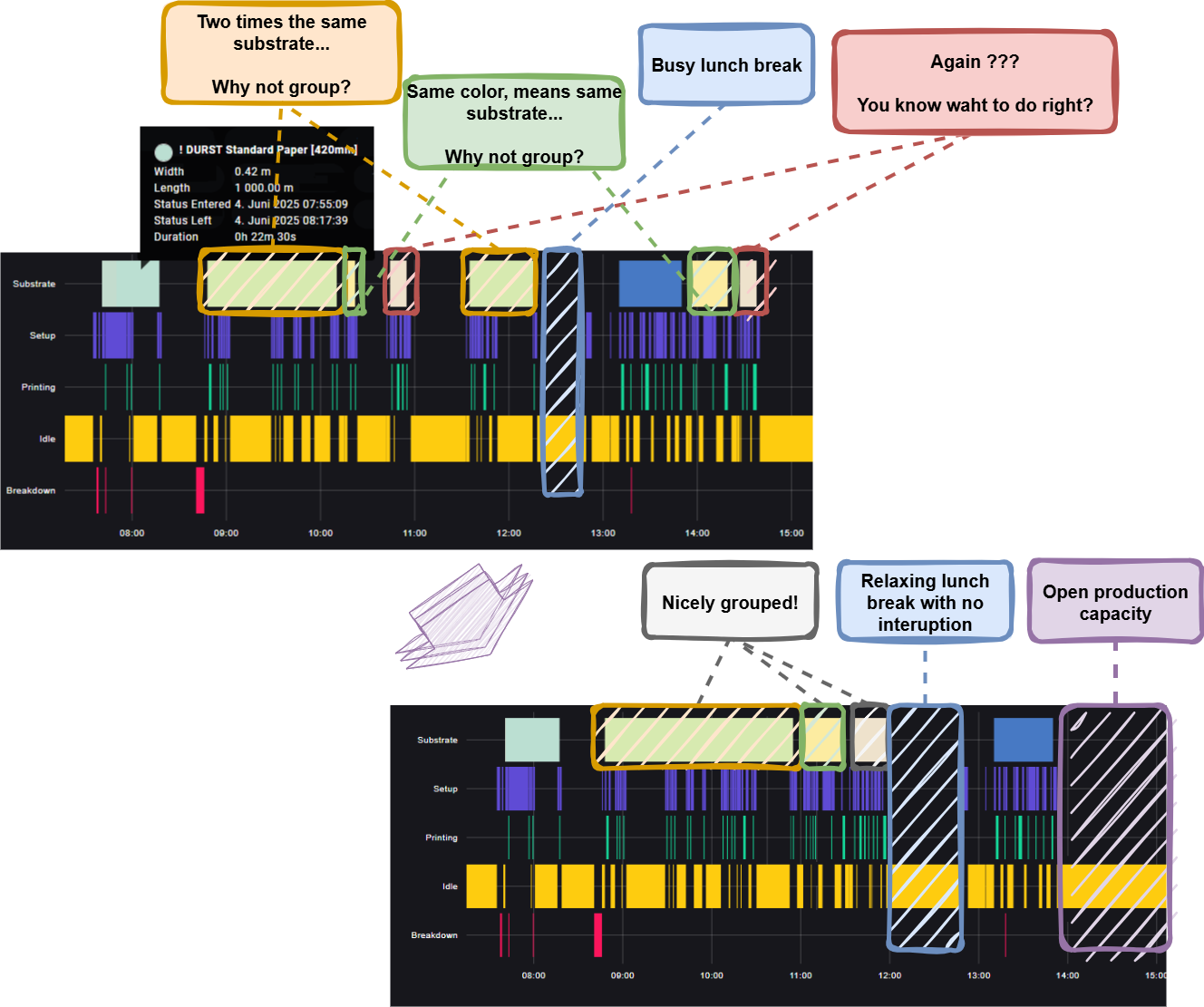
This is an idealized scenario based on real data from one of your DEMO machines in Brixen. We used image manipulation tools to illustrate a more efficient timeline.
In real-world production, such perfect alignment is often not feasible due to constraints like customer deadlines, job priorities, or machine availability.
Still, the takeaway is clear, striving for better grouping of jobs by substrate can meaningfully improve efficiency and better utilize resources.